Campaign Summary Report
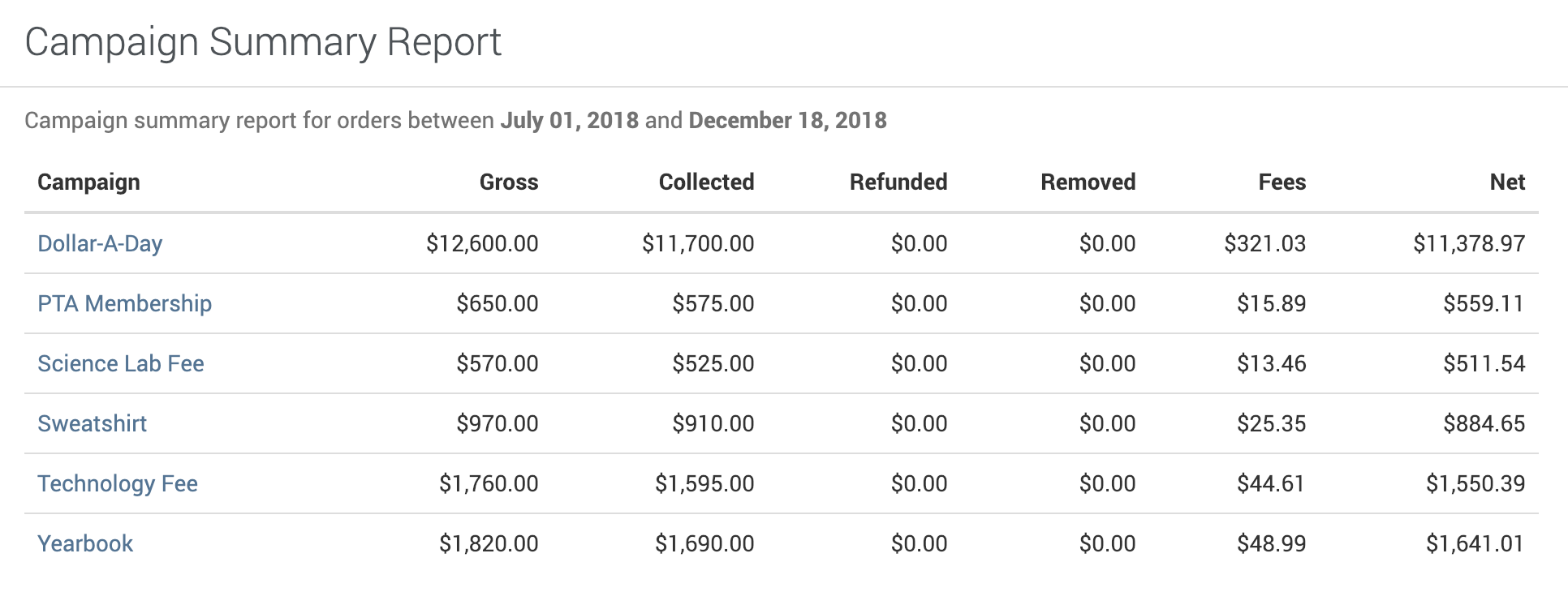
Filtering
The report is filterable by the following fields:
- Order Date
- Fund (the organization the money goes to)
Data Fields
The following fields are included in the report:
| Column | Description |
|---|---|
| Campaign | The name of the campaign in the default language. |
| Gross | The full amount of everything ordered. A payment plan or recurring gift counts in full on the day the family signs up. Check and cash orders count right away, even before they are marked paid. Items removed from an order are not counted. A fully refunded item is removed from its order, so it drops out of Gross. A partial refund on a Donation Drive lowers Gross by the refunded amount. Other partial refunds are not taken out. |
| Collected | The money actually received. Card payments count once charged, and check or cash payments once marked paid. Each payment on a payment plan or recurring gift is added as it is charged. Refunds are shown in their own column. |
| Refunded | The sum of the refunded transactions. This is always a negative number. |
| Fees | The sum of the fees for a set of transactions. This could be a negative or positive number. Transaction fees are calculated for each campaign with an accuracy +/- $0.01. The transaction fee of $0.30 is distributed evenly based on the dollar amount of the items. |
| Net | Collected, minus refunds, minus fees. |
Campaigns Sold in a Bundle
When a campaign was sold both inside a bundle and on its own, smaller indented rows appear under it. Each one shows the part that came from one bundle, or from the campaign Purchased on its own. The campaign’s own row is still the total, so the indented rows don’t add anything extra to the columns.
Why Gross and Collected Are Different
Gross counts what families ordered. Collected counts what has been paid so far. The difference is usually one of these:
- Payment plan and recurring gift payments still to come. The full amount is in Gross from the sign-up day, and Collected grows as each payment is charged. See Recurring Payments to check what each family has paid and when the next payment is due.
- Cancelled payment plans. When a card payment plan is cancelled, by you or automatically after the card is declined 3 times in a row, its unpaid payments stay in Gross and never reach Collected. The same goes for a check or cash installment you cancel. The exception is a sign-up that was never charged: cancelling it, or clicking Release Spot, voids the order, so it drops out of Gross.
- Check and cash orders not yet marked paid. They count in Gross when ordered, and in Collected once you mark them paid. The Offline Payments Pending report lists each of these orders and how much is still owed. It doesn’t list the later payments on a check or cash installment plan. Those are on the Installment Plan report.
- Refunds. A fully refunded item drops out of Gross, but the payment for it stays in Collected. The refund shows in the Refunded column. A partial refund on a Donation Drive works the same way for the refunded part. This can make Collected higher than Gross.
How Much Comes From Payment Plans
To see how much of the difference comes from payment plans, open the Installment Plan report and click Export. Add up the Balance column (payments still to come) and the Cancelled column (payments that will never be collected).
Run both reports with the same Fund filter and no Order Date filter, so each one reads All Dates under its title. A later card payment counts in Collected on the day it is charged, but the Installment Plan report lists the whole plan on the day it was ordered. With a date range, the two reports can cover different payments.
Export
Click Export to download the report as an Excel (.xlsx) file. It uses the same filters as the screen.
The file has these columns:
| Column | Description |
|---|---|
| Campaign | The name of the campaign. |
| Source | Filled in only for a campaign sold both inside a bundle and on its own: the bundle’s name, or Purchased on its own. Blank for every other campaign. |
| Gross | Same as on the screen. |
| Collected | Same as on the screen. |
| Refunded | Same as on the screen. |
| Fees | Same as on the screen. |
| Net | Same as on the screen. |
A campaign sold both ways gets one row for each source instead of one total row, so you can add up any column without counting anything twice. Add up a campaign’s rows to get the total you see on the screen.
Was this helpful?