Corporate Matching Summary
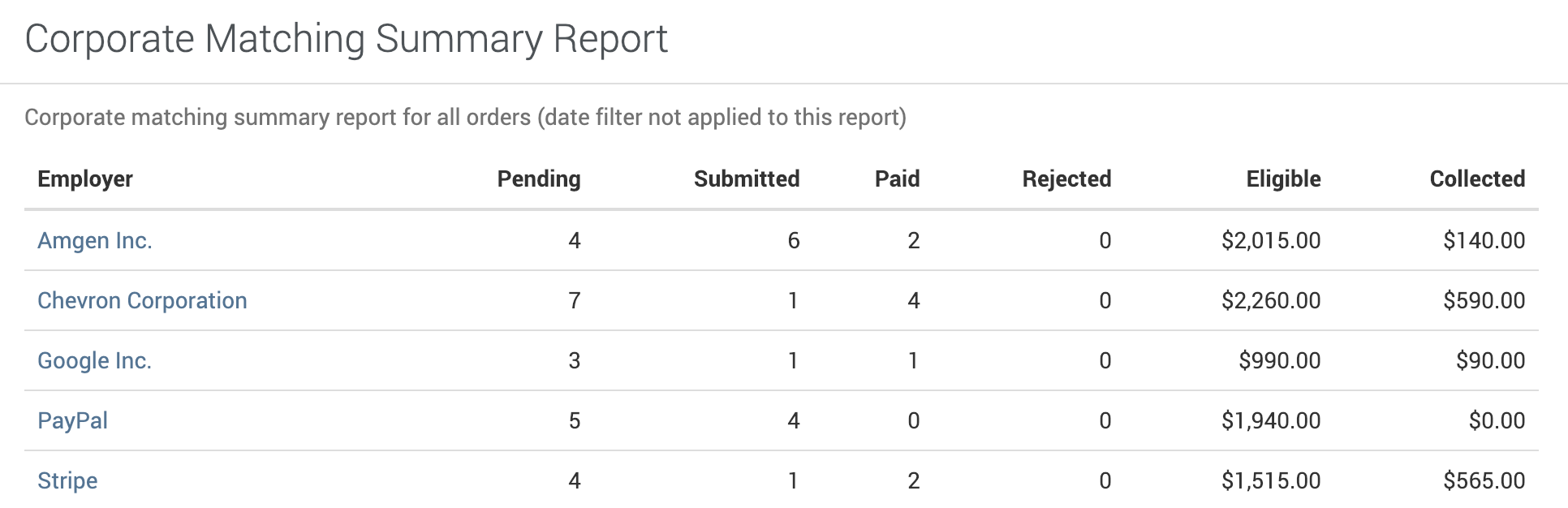
This report includes only matching requests whose employer matched a company in FutureFund’s employer list that has a matching program. If the employer a donor entered wasn’t recognized, the request is left out of this report and out of both exports. You can still see it on the order: open the order from Orders & Payouts and look in the Corporate Matching section.
Filtering
The report is filterable by the following fields:
- Order date
- Fund
Data Fields
The following fields are included in the report:
| Column | Description |
|---|---|
| Employer | The name of the employer. Click it to see the matching orders. |
| Eligible | The amount eligible for matching funds. |
| Collected | The amount collected in matching funds from employers. |
When two parents on one order are both eligible, each one is counted at the full eligible amount. That means one donation can show up under both of their employers.
Export
Use the buttons at the top of the report card:
- Export Summary: one row per employer, with the Employer, Eligible, and Collected columns.
- Export Detail: one row per request, with Order Number, Order Date, Donor First Name, Donor Last Name, Donor Email, Donor Phone, Employer, Organization, Status, Eligible, and Collected.
Both download as a CSV file and follow the filters you’ve chosen.
Was this helpful?