Unit Sale Report
The unit sale report shows the number of units sold, delivered, and still to be delivered for each product and option.
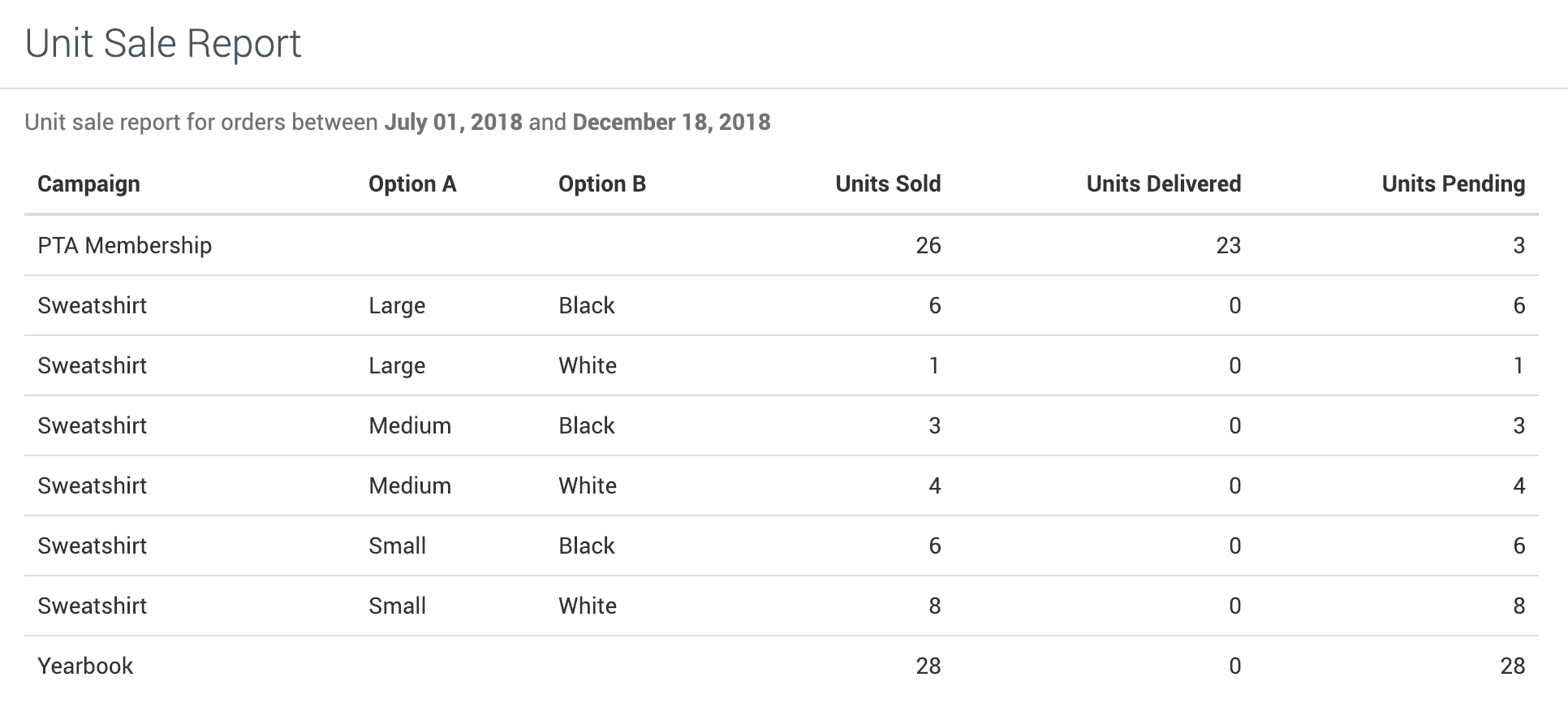
The Unit Sale report counts the units sold for each product campaign, broken out by option (like size or color). It adds up sales from every channel together: First Step, your online store, SnackBar, and orders entered by hand. Only product campaigns are included, not donations, memberships, or tickets.
Finding the Report
- Go to Orders & Payouts > Reports.
- Click Unit Sale.
Filtering
The report is filterable by the following fields:
- Order Date
- Organization
Data Fields
The following fields are included in the report:
| Column | Description |
|---|---|
| Campaign | The name of the campaign in the default language. |
| Options | The option combination sold, if the product has options. |
| Units Sold | The number of units sold for the option combination. |
| Units Delivered | The number of units marked as delivered. |
| Units Pending | The number of units not yet marked as delivered. |
SnackBar sales are handed over at the register, but they aren’t marked as delivered, so they count toward **Units Pending**.
To see how many units of one campaign sold through each channel, such as SnackBar cash vs. card, use Sales by Channel on the campaign’s Overview page.
Export
Click Export to download an Excel (.xlsx) file with the columns Campaign Name, Options, Units Sold, Units Delivered, and Units Need Delivery.
Was this helpful?